
Chronological Age Calculator
Here is our free chronological age calculator — punch in a birth date and a target date, get back exact years, months, and days. We built in cumulative months, total weeks, and one-click export because that is what we actually need when scoring assessments. No fluff, just accurate math that handles leap years and month-length quirks correctly.
Enter Date Details
Your Results
Chronological Age
-
Years
-
Months
-
Days
Clinical Mode: Age rounded per standard assessment protocols. Verify against specific publisher guidelines (Pearson, BRIGANCE, etc.).
Enter dates and click Calculate to see results
100% Accurate
Leap-year aware calculation
Privacy Protected
No data leaves your device
Print & Copy
Export results instantly
Clinical Standard
Used by SLPs & psychologists
Note for Clinicians & Educators
Heads up — this tool gives you chronological age only. It does not compute corrected or gestational age for preemies. If you're working with a premature infant, check your assessment manual (whether you follow Pearson or BRIGANCE protocols) and use our adjusted age calculator instead.
What Is a Chronological Age Calculator?
A chronological age calculator answers one question: exactly how much time has passed between birth and a target date? Not just years — years, months, and days, computed properly with all the calendar weirdness (leap years, 28-day Februaries, 31-day months) handled correctly.
Our chronological age calculator throws in total months, total weeks, and total days too — because if you're filling out assessment forms or tracking developmental milestones, you need those numbers ready to go.
How to Use This Calculator
It's not rocket science, but here is the walkthrough anyway. Type the birth date into the first field. Type your target date into the second one (or leave it blank for today). Hit "Calculate Age." That is it. If you're doing this for a clinical assessment, flip the mode switch to Clinical — it'll round the result the way test publishers expect.
You'll see years, months, and days front and center. Scroll down a bit and you'll find total months, total weeks, and total days — all the numbers you'd otherwise have to calculate separately for your paperwork.
The Borrowing Method Explained
Here is how the borrowing method actually works. Say you need to subtract the 28th from the 15th. You cannot — 15 is smaller than 28. So you "borrow" from the month column. You take one month, convert it to days (however many days were in that previous month), and add it to your 15. Now you can subtract. Same deal if your months column ends up negative — borrow 12 months from the year.
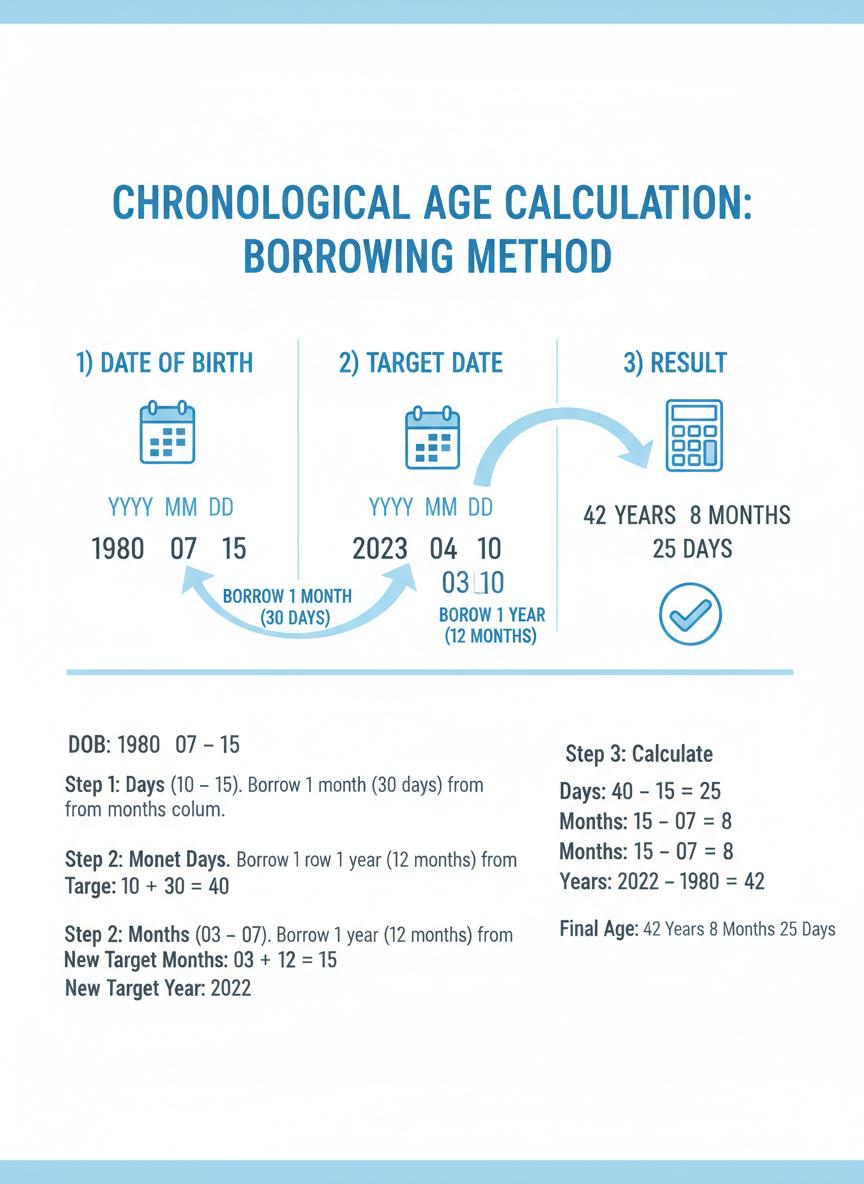
Real example: born November 28, 2014. Target date: January 15, 2026. Days: 15 minus 28 — cannot do it, so borrow 31 days from December. Now it is 46 minus 28 = 18 days. Months: we borrowed one, so January became December (month 0), and 0 minus 11 — still cannot do it. Borrow a year: 12 minus 11 = 1 month. Years: 2025 minus 2014 = 11 years. Final answer: 11 years, 1 month, 18 days. That is the borrowing method — tedious by hand, instant with our calculator.
How Accurate Is This Calculator?
When you're scoring a WISC-V or writing an eligibility report, accuracy is not optional. Our chronological age calculator nails it because we fixed the mistakes people make by hand:
- Leap Year Handling: It checks every year in the span. February 29th? Handled. Century years that are not leap years? Also handled. You'd be surprised how many calculators get this wrong.
- Exact Month Length: Some calculators just assume 30 days per month. That is fine until it isn't. We use the actual days — 28, 29, 30, or 31 — whatever the calendar really says.
- Borrowing Done Right: The borrow-from-months, borrow-from-years method is what Pearson, BRIGANCE, and everyone else specifies. We follow that exactly.
- No Fat-Finger Errors: Let's be honest — borrowing across months while a parent watches is stressful. The calculator does not get nervous or forget to carry.
What You Can Do With This Tool
We built this chronological age calculator because we got tired of tools that only did half the job. Here is what you actually get:
- Instant Results: Type dates, hit calculate, get your answer. No page reload, no spinning wheel.
- Cumulative Months: The total months since birth — most assessment forms want this, so we put it right there.
- Copy to Clipboard: One click, paste into your report. Done.
- Print a Report: Generates a clean page you can actually attach to a clinical file.
- Clinical Mode: Rounds the result the way test publishers want it — nearest month, no days.
- Time Zone Agnostic: We are using calendar dates, not timestamps. Works the same everywhere.
Who Uses This Calculator?
We see all kinds of people using our chronological age calculator — here is who is showing up most:
Speech-Language Pathologists (SLPs) pull this up before pretty much every eval. Wrong age means wrong norms, and wrong norms can literally change a diagnosis. Nobody wants that.
School Psychologists need precise ages for WISC-V scoring, KTEA-3, and everything else in their testing battery. The norm table you use depends entirely on getting this right.
Occupational Therapists use it for the PDMS-2, Sensory Profile-2, and other tools where age determines what 'typical' even means for that kid.
Educators need it for grade placement, gifted program screening, and special ed eligibility. Cutoff dates are real, and a day can matter.
Parents use it too — tracking milestones, checking school readiness, or just settling a bet about exactly how old someone is.
Why We Built This Tool
Many professionals previously relied on the Pearson chronological age calculator, the BRIGANCE age calculator, and other publisher-provided tools. However, as websites get redesigned and priorities shift, these tools tend to disappear. Pearson officially stated they "no longer have a live age calculator on our site."
We built ChronoCalc to fill this gap. Our chronological age calculator serves as a reliable, accessible alternative that will always be available, always free, and always accurate. We use it ourselves every week for clinical evaluations.
Tips That Actually Help
A few things we have learned the hard way:
- Check the year twice. Seriously. A typo in the birth year throws everything off, and it is the easiest mistake to make.
- Use the right target date. For assessments, that is the testing date — not today, not yesterday. For school cutoff questions, use the district's specific date.
- Stick with one calculator. If you use ChronoCalc for your first eval, use it for the re-eval too. Consistency matters when someone audits your records.
- Leap year birthdays need a call. If the kid was born February 29th, check your manual — does it say to treat the effective birth date as February 28th or March 1st in non-leap years? Different publishers do it differently.
Doing It By Hand
Sometimes you do not have a device handy, or you just want to understand the math. To calculate chronological age by hand, write the target date over the birth date (year over year, month over month, day over day). Subtract days first — borrow from the month column if you need to. Then months — borrow from the year if needed. Then years.
Want the full walkthrough with examples that make sense? Check out our complete guide to calculating chronological age manually.